

Querying with SQL
Learn how to write SQL queries to pull data from your data warehouse into Pocus
The SQL Query Editor allows you to connect to your various data warehouses (such as Snowflake, Redshift, BigQuery, Databricks, and Athena) and execute queries using SQL. Most data warehouses will adhere to standard SQL syntax, however some do have unique syntax variations. For detailed syntax guidance, refer to the official documentation for your data warehouse provider:
Query Testing and Preview
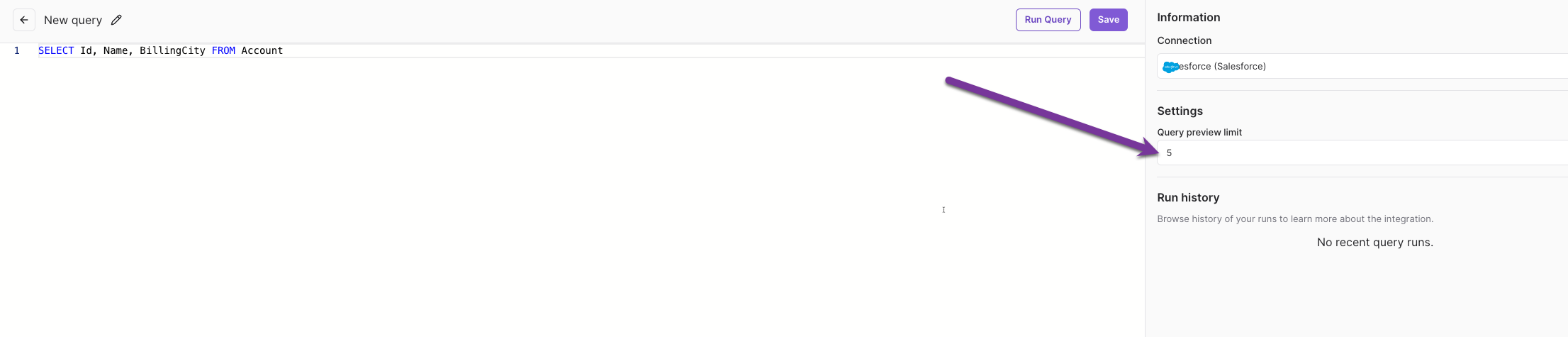
The SQL Query Editor provides an interactive environment to test and preview your queries. The Query Preview Limit field will control the number of rows returned in the preview. The default preview limit is 5, but you can modify this as needed.
Basic SQL Queries
This guide provides a basic overview of how to get started with SQL queries. For more comprehensive look at writing SQL queries, please visit Microsoft's SQL Query Syntax documentation
Helpful Tip:The goal is to have one row per identifier returned from the query you write. In order to accomplish this, you will often have to do aggregations (roll-ups). For example, event based data often has a record for every day or each event. Instead, you may want to group by the user_id and do some aggregations to find common data points (such as first time the event occurred, the most recent, number of events in the last X days, etc.)
Selecting Data
Use the SELECT statement to retrieve data from a table. For example, the below statement will retrieve all records from a table named Users:
SELECT * FROM UsersFiltering Data
Use the WHERE clause to filter results. For example, the below statement will pull all users who have a title of Director:
SELECT * FROM Users
WHERE title = 'Director'
Use operators such as AND and OR to further filter data by combining multiple conditions. For example, the below statement is looking for all opportunities with a sell-type of cross-sell or up-sell:
SELECT * FROM Opportunities
WHERE sell_type = 'cross-sell' OR sell_type = 'up-sell'
Operators such as LIKE and NOT LIKE allow for partial matching. For example, the query statement below would exclude any users who have a Gmail email address:
SELECT * FROM Users
WHERE email_address NOT LIKE '%gmail.com'
Sorting Data
Use the ORDER BY clause to sort results:
SELECT * FROM Accounts
ORDER BY AcctRep NULLS LAST
Aggregating Data
Use aggregate functions like COUNT, SUM, AVG, MIN, and MAX:
SELECT COUNT(*), AVG(sales_amount)
FROM SalesTable
WHERE region = 'East'
Grouping Data
Group results using the GROUP BY clause. This is often used in combination with aggregation functions. For instance, the below query statement would calculate total sales by region:
SELECT region, SUM(sales_amount)
FROM SalesTable
GROUP BY region
If you need further assistance, consult the official documentation for your specific data warehouse or reach out to your Pocus support team.
Updated over 1 year ago