

Custom Expressions - Pocus Query Language
Learn how to do some last mile modeling with POQL
What is the Pocus Query Language?
Also known as PoQL (poh-quill), the Pocus Query Language is an internal feature that not only allows you to modify and transform your fields in Pocus but also allows you to create new fields by pulling data from associated objects or referencing historical data.
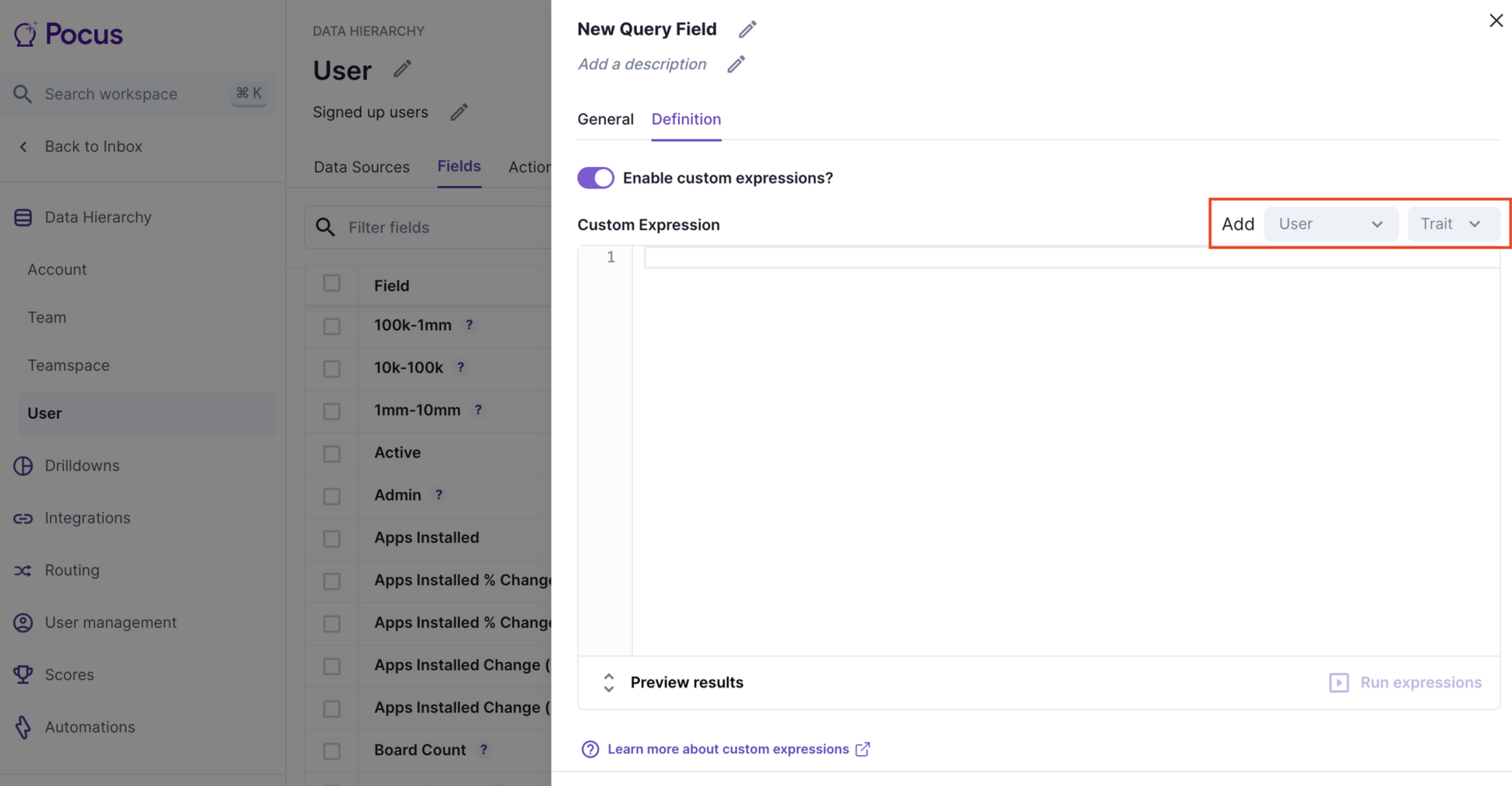
To enable PoQL on a particular field, you can go into the field tab in the object settings. Click the edit symbol on the relevant field (or add a new field using the plus button in the top right of the field tab), select the field ‘Definition’, and toggle on Enable custom expressions?. Once this is done, you can select the fields you would like from which objects by using the drop-downs highlighted in the screenshot below.
Use the Run expressions button to get a sample of results for the PoQL query you have written. Note: A full data refresh will need to run before the results are available for use throughout the workspace.
PoQL uses the IDs of fields (referenced as traits in the queries) to reference values. The syntax used for PoQL is based on Jinja Templates and uses PrestoSQL with some notable limitations. If you are not familiar with these syntaxes please refer to some of the example queries below. If you need additional assistance feel free to reach out to your Pocus support team!
PoQL Query Examples
I want to do a calculation with existing fields on the object I’m on
Example 1: Create a calculation of the percent users that are active in the last 7 days, when I already have a field foractive_users_l7d andtotal_users
Write out what you would put in the PrestoSQL SELECT statement without the SELECT
active_users_l7d * 100 / NULLIF(total_users, 0)Now we’re going to replace the field names with the proper identifiers. Use the dropdowns highlighted above to pull in the right identifiers for the fields you want. Instead of the names of the fields, you’ll now see a {{pocus:use_trait('USER_DEFINED:XXX')}}. This will look something like
{{pocus:use_trait('USER_DEFINED:544bb699-8fb9-4796-8dda-5869bc549ee7')}} * 100 / NULLIF({{pocus:use_trait('USER_DEFINED:3jdis83-8fb9-4796-8dda-58shdh3728')}}, 0)Example 2: Coalescing title from multiple data sources fields
---Instead of COALESCE(sfdc_title, onboarding_job_title, clearbit_title)

COALESCE({{pocus:use_trait('USER_DEFINED:544bb699-8fb9-4796-8dda-5869bc549ee7')}
				, {{pocus:use_trait('USER_DEFINED:3jdis83-3fb3-4796-8dda-58shdh3728')}}
				, {{pocus:use_trait('USER_DEFINED:2227dhh699-8f8d9-4796-8dda-34892bc549de4')}})
In addition to fields, you can also use Signals and Scores in your calculations as well. A few notes about their data types
- Scores:
{{pocus:use_trait('SCORE_CATEGORY:<id of score>')}}- Returns -1 (Not enough data), 0 (Poor), 1 (Fair), 2 (Good), 3 (Excellent)
- Signal membership:
{{pocus:use_trait('SIGNAL_MEMBERSHIP:<id of signal>')}}- Returns boolean value
I want to aggregate from associated objects
From the dropdown, you can select fields from different objects that are associated to the one you are currently on. You notice when you select one that it automatically adds in some Jinja tags. The first {% associated XXX %} is to tell Pocus what object to reference. The second {% select %} is to contain the aggregate function you need to right because associations can be many:many. Let’s walk through some examples:
Example 3: I want to know how many users on the account have 2+ invites
- Start with an associated tag that has the
object_configuration_idof the associated object you want to reference. You can find this in the URL of the object, or by adding a field for that object in the above dropdown.
{% associated <object_configuration_id> %}

  [PLACEHOLDER]

{% endassociated %}
If we are building this as a trait on the account, grab theobject_configuration_id of the user object**
{% associated e76bba93-11c2-424b-b18b-ff630cdb7e1f %}

  [PLACEHOLDER]

{% endassociated %}- Add a select tag that will contain the presto SQL that you want to write. This will need to be an aggregation if pulling from an association that will return multiple records. If you don’t do an aggregation, it will just return a random value.
{% associated <object_configuration_id> %}
	{% select %}
	  [PLACEHOLDER]
	{% endselect %}
{% endassociated %}
Example: Count the users associated with the account
{% associated e76bba93-11c2-424b-b18b-ff630cdb7e1f %}
	{% select %}
		COUNT(*)
	{% endselect %}
{% endassociated %}- Add a where tag below the select tag to limit the counting to records that meet the criteria
{% associated <object_configuration_id> %}
	{% select %}
	  [PLACEHOLDER SELECT STATEMENT]
	{% endselect %}
	{% where %}
   [PLACEHOLDER WHERE CLAUSE]
	{% endwhere %}
{% endassociated %}
Final Example: Count of associated users where invites are greater than 2
{% associated e76bba93-11c2-424b-b18b-ff630cdb7e1f %}
	{% select %}
		COUNT(*)
	{% endselect %}
	{% where %}
		{{pocus:use_trait('USER_DEFINED:544bb699-8fb9-4796-8dda-5869bc549ee7')}} > 2
	{% endwhere %}
{% endassociated %}
Where num_invites field on the user = {{pocus:use_trait('USER_DEFINED:544bb699-8fb9-4796-8dda-5869bc549ee7')}}
Example 4: Rounded to 2 decimals, average number of invites across all associated users
{% associated e76bba93-11c2-424b-b18b-ff630cdb7e1f %}
	{% select %}
		ROUND(AVG({{pocus:use_trait('USER_DEFINED:544bb699-8fb9-4796-8dda-5869bc549ee7')}}),2)
	{% endselect %}
{% endassociated %}
I want to know the historical value of some trait
You can also use PoQL to access historical traits outside of the default 7 and 30-day metrics provided.
{% historical <day> %}
  [PLACEHOLDER]
{% endhistorical %}
Example 5: Return the user invite count number from 2 days ago on the user object
{% historical 2 %}
		{{pocus:use_trait('USER_DEFINED:544bb699-8fb9-4796-8dda-5869bc549ee7')}}
{% endhistorical %}
Example 6: % change of user invites sent field last 14 days
100 * (
      CAST({{pocus:use_trait('USER_DEFINED:544bb699-8fb9-4796-8dda-5869bc549ee7')}} as double)
      -
    {% historical 14 %}
      CAST({{pocus:use_trait('USER_DEFINED:544bb699-8fb9-4796-8dda-5869bc549ee7')}} as double)
      ) / NULLIF(	{{pocus:use_trait('USER_DEFINED:544bb699-8fb9-4796-8dda-5869bc549ee7')}}, 0)
    {% endhistorical %}
What this is saying is 100 * invites today - invites 14 days ago / invites 14 days ago. Everything inside of the {% historical %} tag will look at results from that many days ago.
I want to coalesce across multiple values
PoQL for creating traits
Every Trait “points” to a field or collection of fields. If you need a trait to be informed by more than one field with the same name you can do so using the POQL query
[{{ pocus:use_query_fields_with_name('query_field_name', "DATATYPE") }}]Updated over 1 year ago