

Internal Variables
Learn how to pass in custom variables to your third-party tools
Introducing the secret In N’ Out menu of Pocus! In addition to the data points you’re pulling in from your CRM and Data Warehouse –– what you see when you click Add Data –– Pocus can also pass back a handful of custom variables to your different tools when setting up an action.
Custom Variables
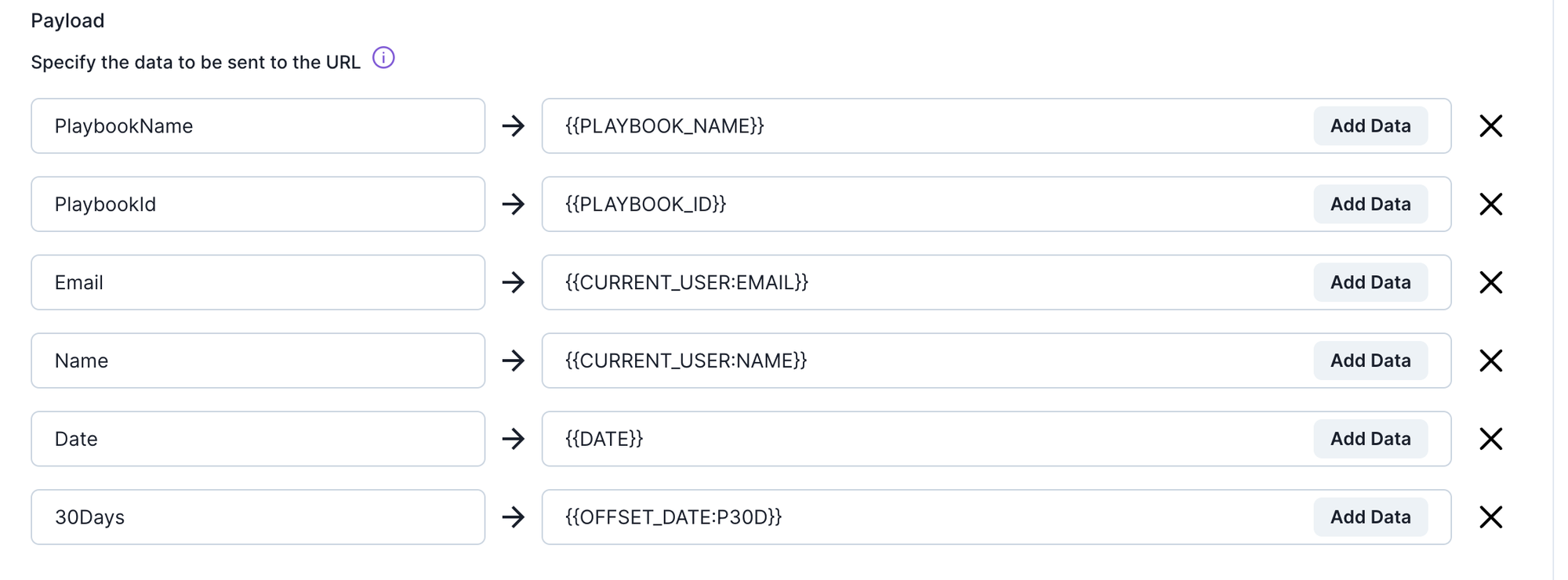
The following strings can be used en lieu of a static value or trait variable to pass the value of the variable at the time of the action being triggered:
Playbook Variables
{{PLAYBOOK_NAME}}
This is going to pass in the name of the playbook from where the action was invoked, whether that's from the inbox or the playbook overview page. This variable will also persist into any drilldown opened from the inbox or playbook overview page. If this action was taken from a location where we don't know the playbook, it will pass in the value “UNKNOWN.”
{{PLAYBOOK_ID}}
This is the same except for the Pocus ID of the playbook.
{{PLAYBOOK_SALESFORCE_CAMPAIGN_ID}}
This will pass in the SFDC Campaign Object Id for the campaign selected within Action overrides on a given playbook. See here for more on Action Overrides.
User Variables
{{CURRENT_USER:EMAIL}}
This will send the email of the user who clicked the button.
{{CURRENT_USER:NAME}}
This will send the name of the user who invoked the action.
{{CURRENT_USER:SALESFORCE_ID}}
This will send the Salesforce User ID of the user that invoked the action. Note this only works on Salesforce Actions. Helpful for setting the owner!
{{CURRENT_USER:HUBSPOT_ID}}
This will send the Hubspot User ID of the user that invoked the action. Note this only works on Hubspot Actions. Helpful for setting the owner!
{{CURRENT_USER:CONNECTION_ID:<connection uuid>}}
This will send the User ID from the connection source for the user that invoked the action. This will work for Salesloft and Outreach.
Date Variables
{{DATE}}
This is today’s date in the UTC timezone. Add {{DATE:<format>}} to change the date format and timezone
{{OFFSET_DATE:<ISO 8601 duration>:<format>}}
This is used to pass in relative dates. The offset uses ISO 9601 Duration Format. For example, if you want to pass in a date that is 30 days from today’s date, use {{OFFSET_DATE:P30D}}.
The syntax for the offset date will be {{OFFSET_DATE:<ISO 8601 duration>:<format>}}
To include the timestamp in UTC use the following formatting {{DATE:yyyy-MM-dd'T'HH:mm:ssXX}}
Enrichment Variables
{{POCUS_ENRICHMENT:EMAIL}}
This variable makes a 3rd party request to lookup a user's email address based on name and enriched LinkedIn Company name. This is helpful for job switchers and lead finder. Note: Use of this variable is limited based on your contract. Reach out to Pocus support to determine your limit.
{{POCUS_ENRICHMENT:EMAIL_DOMAIN}
This variable makes a 3rd party request to lookup the company domain for a user based on name and enriched LinkedIn Company Name. This variable must be used with {{POCUS_ENRICHMENT:EMAIL}}.
Updated over 1 year ago