

AI Alerts
Pocus' AI Alerts feature provides proactive notifications about key events and developments at customer and prospect companies. These alerts are designed to give teams relevant, actionable insights by surfacing company updates, before they are yesterday's news. Never miss an actionable moment with our timely alerts!
To get started, select the Feed icon in the upper right corner of Pocus to visit the AI Alerts Feed

👋 AI Alerts can also be viewed from your traditional inbox view by expanding any playbooks denoted as AI Playbook
|

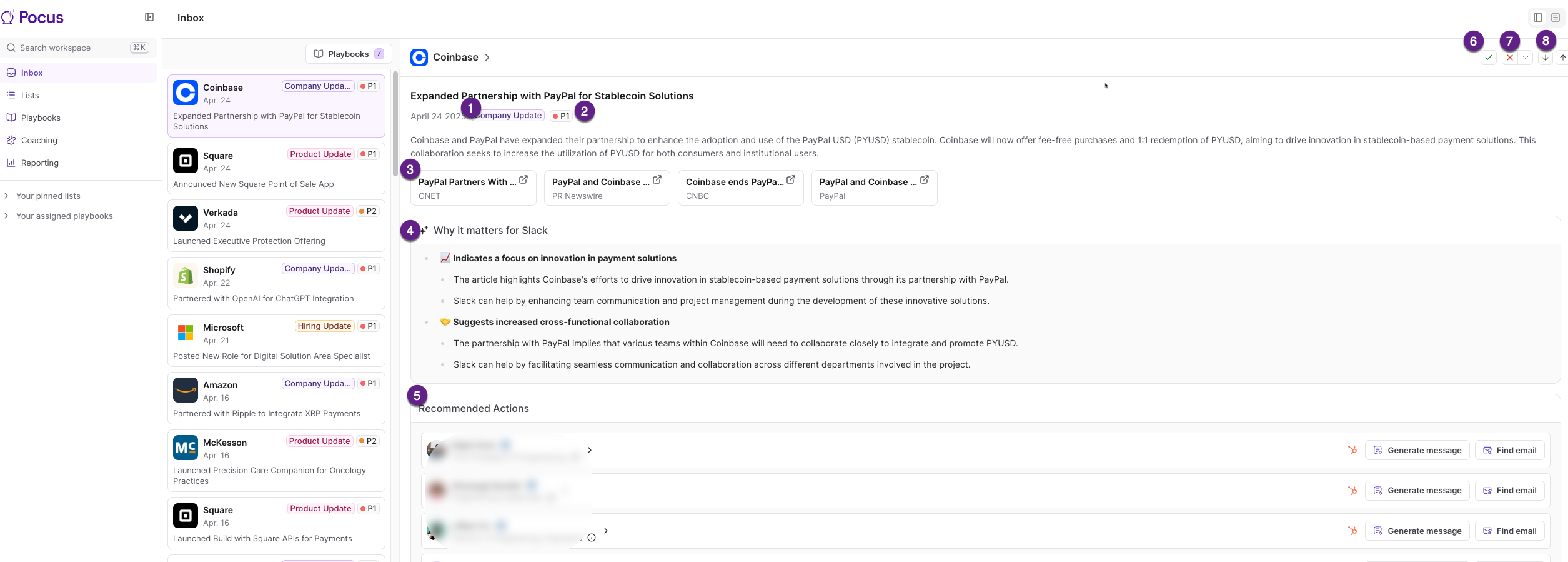
Below is a sample view of an AI alert:
-
Alert Category: Each alert will be tagged with a type. Presently alerts will fall into one of the following categories:
- Financial Updates
- Executive Event
- Hiring Update
- Product Update
- Company Update
-
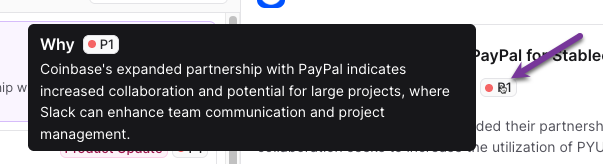
Alert Priority: Each alert will show a priority. Hover your mouse icon over the priority rating (such as P1) to learn why the alert was considered the designated priority.
-
Sources: View and access the sources utilized by Pocus AI to generate insights.
-
Why it Matters: Learn why the alert is relevant for your company
-
Recommended Actions: Review a list of suggested best contacts and take action right from the alert! You can use Find Email to lookup the contacts email address, Generate Message to leverage our AI Email Generator to craft the perfect messaging, or even customize actions, such as Enroll In Hubspot Sequence
-
Mark Done: Once you have completed any desired actions and outreach and are finished with the alert, use the Mark Done checkmark to clear it from the Alerts Feed. Note: this action marks the alert done for all users
-
Disqualify: If you find the alert to be invalid or not relevant, you can use the Disqualify X mark. Use the down arrow next to the red X to choose a disqualification reason. Note: this action marks the alert done for all users
-
Navigation Arrows: Use the navigational arrows to quickly page through the alerts.
Updated over 1 year ago