

Pocus Data Share Reference
This page explains the tables that Pocus shares via Snowflake. Reach out to our team if you have any questions!
Tables
Table names on this document are listed without customer prefixes. For example, instead of ACTION_HISTORY, Google would actually have a table named GOOGLE_ACTION_HISTORY. Data for all tables is refreshed every 12 hours.
ACTION_HISTORY
This table records the history of actions performed within the Pocus system. This includes actions taken on integrations (i.e. updating Salesforce or enrolling a user into an Outreach sequence) as well as snoozes (i.e. users hiding records from themselves).
| Column name | Description |
|---|---|
| TIMESTAMP | The timestamp when the action was performed. |
| OBJECT_CONFIGURATION_ID | The identifier of the object configuration associated with the action. |
| ID | The primary key for this table, a unique identifier for each action invocation |
| POCUS_ID | The internal identifier for the row of data within Pocus. |
| EXTERNAL_ID_NAME | The name of the primary key that EXTERNAL_ID uses. For example, USER_ID |
| EXTERNAL_ID | The value for the primary key for this row of data within your system. For example, ABC123 |
| ACTION_CONFIGURATION_ID | The identifier of the action configuration for this action. |
| ACTION_NAME | The name or label of the action. |
| ACTION_TYPE | The type of action performed (e.g., create, update, delete). |
| ACTIONED_BY_EMAIL | The email address of the user or system that performed the action. |
| ACTION_SUCCESS | The indication wether or not the invocation completed successfully |
| INBOX_ENTRY_ID | The identifier for the inbox entry being acted on (if the acted on item is in a playbook) |
| SOURCE_ID | The identifier for the context of where the item was acted on |
| SOURCE_TYPE | The context of where the item was acted on (PLAYBOOK, LIST, or DRILLDOWN) |
CURRENT_INBOX_STATE
This table stores the current state of inbox entries in the Pocus system. The data in this table powers the inbox that users see in the Pocus application.
| Column name | Description |
|---|---|
| INBOX_ENTRY_ID | Unique identifier for each inbox entry. If a row of data is surfaced multiple times, it will be given a new inbox entry ID each time. |
| POCUS_ID | The internal identifier for the row of data within Pocus. |
| EXTERNAL_ID_NAME | The name of the primary key that EXTERNAL_ID uses. For example, USER_ID |
| EXTERNAL_ID | The primary key for this table, a unique identifier for current inbox states |
| OBJECT_CONFIGURATION_ID | The identifier of the object configuration associated with the inbox entry. |
| PLAYBOOK_ID | The identifier of the playbook associated with the inbox entry. |
| SURFACED_AT | The timestamp when the inbox entry was surfaced. |
| UPDATED_AT | The timestamp when the inbox entry was last updated. |
| LATEST_STATE | The current state of the inbox entry. See the inbox states section below for more details. |
INBOX_STATE_HISTORY
This table maintains a history log of state changes for inbox entries in the Pocus.
| Column name | Description |
|---|---|
| TIMESTAMP | The timestamp when the state change occurred. |
| ID | The primary key for this table, a unique identifier for inbox state updates |
| OBJECT_CONFIGURATION_ID | The identifier of the object configuration associated with the inbox entry. |
| POCUS_ID | The internal identifier for the row of data within Pocus. |
| EXTERNAL_ID_NAME | The name of the primary key that EXTERNAL_ID uses. For example, USER_ID |
| EXTERNAL_ID | The value for the primary key for this row of data within your system. For example, ABC123 |
| PLAYBOOK_ID | The identifier of the playbook associated with the inbox entry. See the Playbook table for more details. |
| INBOX_ENTRY_ID | Unique identifier for the inbox entry that underwent the state change. |
| NEW_STATE | The new state of the inbox entry after the change. See the inbox states section below for more details. |
| ACTIONED_BY_EMAIL | The email address of the user or system that initiated the state change. Will only be included if the state transition occurred because of a user action (i.e. "Mark done" |
LIST
This table stores information about lists created within Pocus.
| Column name | Description |
|---|---|
| ID | Unique identifier for each list. |
| CREATED_AT | The timestamp when the list was created. |
| UPDATED_AT | The timestamp when the list was last updated. |
| NAME | The name or label of the list. |
| OBJECT_CONFIGURATION_ID | The identifier of the object configuration associated with the list. |
| OWNER_EMAIL | The email address of the user who owns the list. |
| LAST_EDITOR_EMAIL | The email address of the user who last edited the list. |
| FILTER_CONDITIONS | Conditions or criteria used to filter items in the list. |
| LIST_COLUMNS | The columns or attributes included in the list. |
OBJECT_CONFIGURATION
This table stores configurations for various objects within Pocus. For example, User or Account would each be one object configuration.
| Column name | Description |
|---|---|
| ID | Unique identifier for each object configuration. |
| CREATED_AT | The timestamp when the configuration was created. |
| UPDATED_AT | The timestamp when the configuration was last updated. |
| NAME | The name or label of the object configuration. |
PLAYBOOK
This table stores information about playbooks that are configured within Pocus.
| Column name | Description |
|---|---|
| ID | Unique identifier for each playbook. |
| NAME | The name or label of the playbook. |
| GOAL_ID | The identifier of the goal associated with the playbook. |
| CREATED_AT | The timestamp when the playbook was created. |
| UPDATED_AT | The timestamp when the playbook was last updated. |
| QUALIFIED_CONDITIONS | Conditions that determine when the playbook is qualified for execution. |
| OBJECT_CONFIGURATION_ID | The identifier of the object configuration associated with the playbook |
GOAL
This table stores information about goals that are configured within Pocus.
| Column name | Description |
|---|---|
| ID | Unique identifier for each Goal. |
| NAME | The name or label of the Goal. |
| GOAL_CONDITIONS | The conditions that determine if an items meets the set Goal outcomes. |
| CREATED_AT | The timestamp when the Goal was created. |
| UPDATED_AT | The timestamp when the playbook was last updated. |
| ELIGIBLE_CONDITIONS | Conditions that determine when the Goal is qualified for execution. |
| OBJECT_CONFIGURATION_ID | The identifier of the object configuration associated with the playbook. |
USER_ACTIVITY
This table lists every day a user was active in the last 365 days. Rows where a user has a single NULL date value indicates the user has not been active in Pocus
| Column name | Description |
|---|---|
| USER_ID | Unique identifier for each User |
| Email of the user | |
| ACTIVITY_DATE | Date the user was active. Activity is defined as any engagement with Pocus where an item was loaded i.e. drilldown opened, list refreshed, playbook results filtered etc. |
Helpful Queries
Here are some example queries used to provide useful insights into engagement and user activity
Count Days Active By User In Last Month, Week, etc.
Select
EMAIL,
USER_ID,
COUNT_IF(ACTIVITY_DATE > CURRENT_DATE - interval '30 days') as days_active_l30D,
COUNT_IF(ACTIVITY_DATE > CURRENT_DATE - interval '7 days') as days_active_l7D
FROM USER_ACTIVITY
GROUP BY 1,2;
Count of Specified Action Invocations and Playbook Activity in Time Frame
WITH ah AS (
    SELECT ACTIONED_BY_EMAIL
    , CONCAT(object_configuration_id, timestamp) as pk
    , ACTION_TYPE
    FROM action_history
    WHERE ACTIONED_BY_EMAIL IS NOT NULL
    AND TIMESTAMP >= '2023-12-01' //<---- UPDATE AS NEEDED

    UNION ALL

    SELECT ACTIONED_BY_EMAIL //<---- ONLY INCLUDE FOR MARK DONE COUNT
        , CONCAT(object_configuration_id, timestamp) as pk
        , NEW_STATE as ACTION_TYPE
    FROM inbox_state_history
    WHERE NEW_STATE = 'SUPPRESSED' AND ACTIONED_BY_EMAIL IS NOT NULL
    AND TIMESTAMP >= '2023-12-01' //<---- UPDATE AS NEEDED
)

SELECT *
FROM ah
PIVOT(COUNT(pk) FOR
    ACTION_TYPE IN ('GET_OR_CREATE_OUTREACH_PROSPECT', 'ENROLL_IN_OUTREACH_SEQUENCE', 'SUPPRESSED'))
AS p (USER_EMAIL, OPEN_IN_OUTREACH, ENROLL, MARKED_DONE)
ORDER BY USER_EMAIL;
Count of Items Marked Done in Playbooks within Time Frame
SELECT
G.NAME AS GOAL_NAME,
PB.NAME AS PLAYBOOK_NAME,
COUNT_IF(NEW_STATE = 'SUPPRESSED') AS COUNT_MARK_DONE,
PLAYBOOK_ID
FROM INBOX_STATE_HISTORY AS IH
JOIN PLAYBOOK AS PB ON IH.PLAYBOOK_ID = PB.ID
JOIN GOAL AS G ON PB.GOAL_ID = G.ID
WHERE TIMESTAMP >= '2023-12-01' //<----ADJUST AS NEEDED
GROUP BY 1,2,4;
Playbook Action Table
Tells you the distinct playbooks and actions taken on each external identifier (this varies by object acted on).
SELECT
      p.name AS playbook_name,
      g.name,
      external_id,
      external_id_name,
      action_type,
      array_agg(DISTINCT (action_name)) AS action_names,
      MIN(timestamp) AS first_action,
      MAX(timestamp) AS most_recent_action,
      ARRAY_AGG(DISTINCT actioned_by_email) AS actioned_by_emails
    FROM
      action_history ah
      LEFT JOIN playbook p ON p.id = ah.source_id
      LEFT JOIN goal g ON g.id = p.goal_id
    WHERE
      source_type = 'PLAYBOOK'
      AND actioned_by_email IS NOT NULL
      AND action_type != 'MARK_DONE'
      AND action_type != 'SNOOZE_OBJECT'
    GROUP BY
      1,
      2,
      3,
      4,
      5
    ORDER BY
      playbook_name ASC,
      external_id_name ASC,
      action_type ASC
Playbook Funnel Analysis by External ID
For a given playbook and external object when was it first surfaced, most recently surfaced, first marked as done (complete), most recently, and when did it convert (most likely meaning SQL opp)
SELECT p.name as playbook_name
    , g.name as goal_name
    , external_id
    , external_id_name
    , MIN(case when new_state = 'ACTIVE' then timestamp END) as first_active_date
    , MAX(case when new_state = 'ACTIVE' then timestamp END) as last_active_date
    , MIN(case when new_state = 'SUPPRESSED' then timestamp END) as first_markdone_date
    , MAX(case when new_state = 'SUPPRESSED' then timestamp END) as last_markdone_date
    , ARRAY_AGG( DISTINCT (case when new_state = 'SUPPRESSED' then actioned_by_email END)) as markdone_by_array
    , MIN(case when new_state = 'CONVERTED' then timestamp END) as first_converted_date
    , MAX(case when new_state = 'CONVERTED' then timestamp END) as last_converted_date
FROM inbox_state_history ih
LEFT JOIN playbook p ON p.id = ih.playbook_id
LEFT JOIN goal g ON g.id = p.goal_id
WHERE NEW_STATE IN ('ACTIVE', 'SUPPRESSED', 'CONVERTED')
AND timestamp > '2023-12-31' //<----ADJUST AS NEEDED
GROUP BY 1, 2, 3, 4
ORDER BY playbook_name ASC, external_id_name ASC, external_id ASC
Playbook Conversion Pivot Table
High level what the surfaced in pocus -> mark done conversion is as well as the surface -> converted ratio is. Note that conversion likely means Sales Qualified Lead opp and that records do not need to be marked done to count as converted.
WITH
  ie AS (
    SELECT
      INBOX_ENTRY_ID
    FROM
      INBOX_STATE_HISTORY ih
    WHERE
      NEW_STATE = 'ACTIVE'
      AND TIMESTAMP >= DATEADD(MONTH, -3, GETDATE()) //<----ADJUST AS NEEDED
  ),
  raw_data AS (
    SELECT
      CONCAT(g.name, ' - ', p.name) AS playbook_name,
      new_state,
      COUNT(DISTINCT (INBOX_ENTRY_ID)) AS COUNT
    FROM
      INBOX_STATE_HISTORY ih
      LEFT JOIN PLAYBOOK p ON p.id = ih.playbook_id
      LEFT JOIN GOAL g ON g.id = p.goal_id
    WHERE
      INBOX_ENTRY_ID IN (
        SELECT
          INBOX_ENTRY_ID
        FROM
          ie
      )
      AND (
        NEW_STATE LIKE '%ACTIVE%'
        OR NEW_STATE LIKE '%SUPPRESSED%'
        OR NEW_STATE LIKE '%CONVERTED%'
      )
    GROUP BY
      1,
      2
  )
SELECT
  *
FROM
  raw_data PIVOT (
    SUM(COUNT) FOR new_state IN (
      SELECT DISTINCT
        new_state
      FROM
        raw_data
    )
  )
ORDER BY
  playbook_name ASC;
Inbox States
The below diagram describes the different possible states of an inbox entry and how an inbox entry transitions between states.
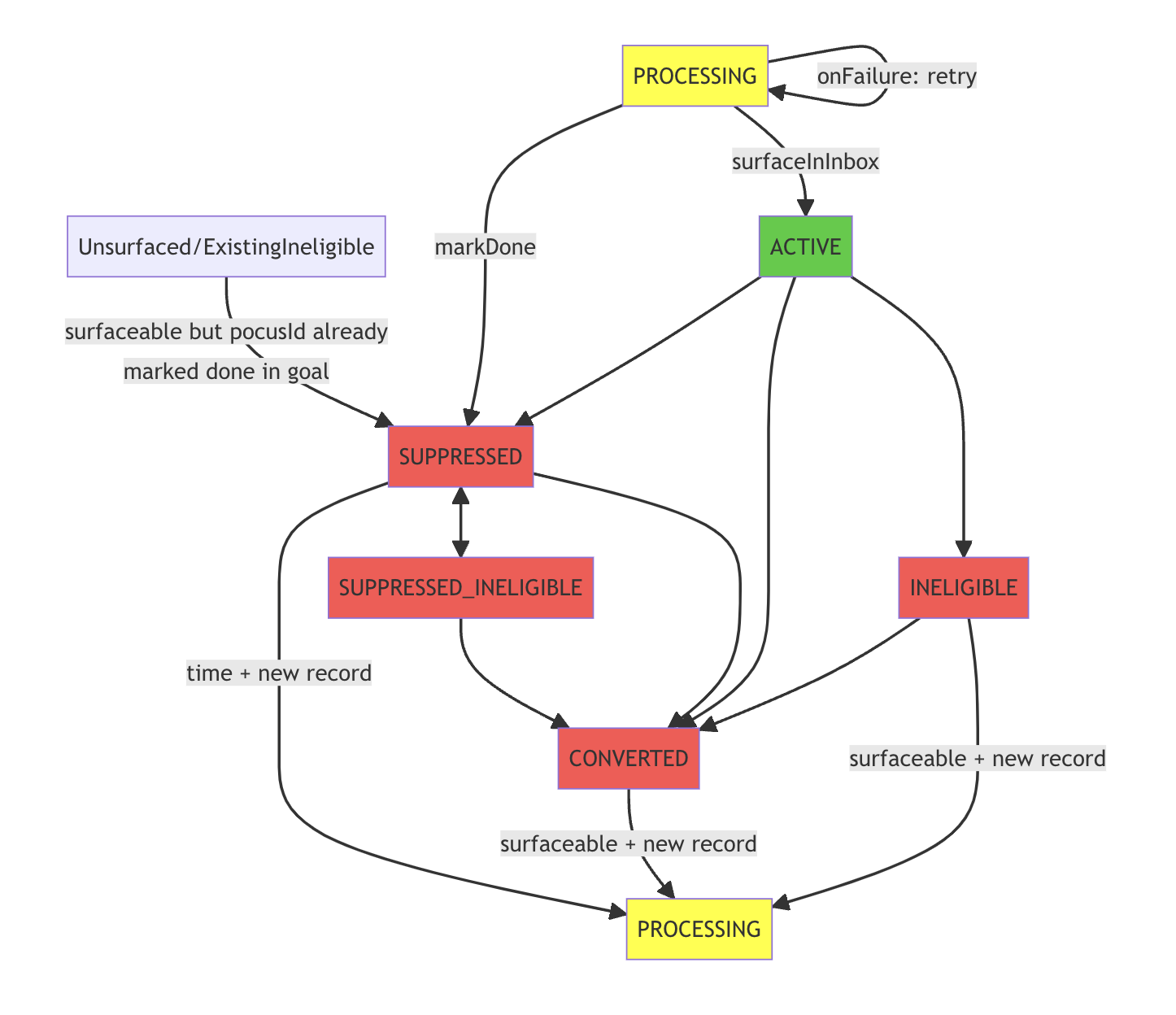
There are 6 states an entry can be in:
- Pre-Active State (in workflow):
PROCESSING-- has entered workflow, pending action.
- Active States (visible in inbox):
ACTIVE-- currently meets all eligibiltiy criteria, not yet converted
- Invisible active states (not visible, but still filter-eligible):
SUPPRESSED-- was marked done or disqualified by a user.
- Inactive States (not visible in inbox):
INELIGIBLE-- not goal or playbook eligibleCONVERTED-- met the goalSUPPRESSED_INELIGIBLE-- was suppressed, now ineligible
Updated over 1 year ago