

People Tab
The People Tab is your centralized hub for prospecting both existing and net new contacts within Pocus. Built with all the power of Pocus Lists, this feature provides a focused, contact-level view of everyone at a given company, streamlining your outreach efforts.
Overview
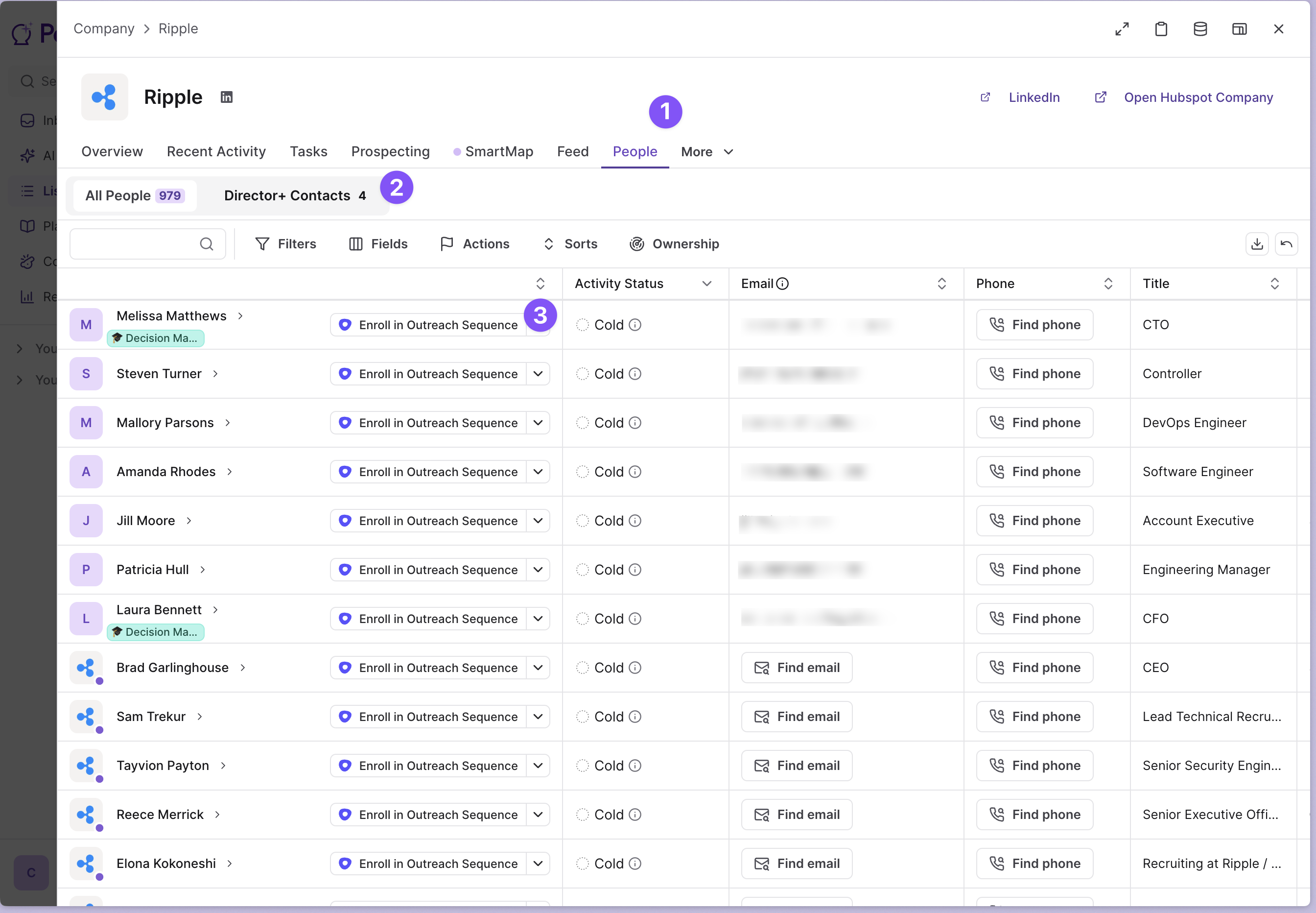
The People Tab (1️⃣) transforms how you engage with prospects by offering a zoomed-in perspective on all contacts associated with a specific company account. Whether you're nurturing existing relationships or identifying new opportunities, this feature puts comprehensive contact intelligence at your fingertips.
Key Features
2️⃣ - Stored Views for Persona-Based Prospecting
Leverage different stored views to quickly toggle between various personas you want to engage with. Each view can be tailored to specific contact types, roles, or engagement strategies, allowing you to switch contexts seamlessly without losing momentum.
Configurable Data Columns
Every stored view can be configured with the specific columns that make prospecting easier, ensuring you have all the relevant data on hand. Customize your view to display the contact information, company data, and engagement metrics that matter most to your workflow.
Flexible Contact Sources
Each view can be configured to include:
- New Pocus-enriched people: Access fresh contact data enhanced by Pocus's enrichment capabilities
- Existing CRM/data warehouse contacts: Work with contacts already in your system
This flexibility ensures you can work with both your established database and discover new opportunities within the same interface.
Saved Filters
Apply and save filters to quickly segment contacts based on specific criteria. These saved filters work in conjunction with your stored views to create highly targeted prospect lists.
3️⃣ - Actionable Workflows
The People Tab includes built-in actions to make your prospecting immediately actionable. Execute outreach campaigns, update contact information, or trigger automated sequences directly from the interface.
Configuration and Administration
All configuration for the People Tab is controlled by administrators. This centralized approach ensures consistent data standards and permissions across your organization while maintaining the flexibility you need for effective prospecting.
Requesting Changes
If you need additional fields displayed or would find certain actions helpful for your workflow, reach out to your administrators to request these additions. Your admin team can configure new columns, actions, and view settings to optimize the People Tab for your specific use cases.
Getting Started
- Access the People Tab from within any company account in Pocus
- Select a stored view that matches your current prospecting objective
- Apply saved filters to narrow down your contact list
- Review the configured columns to gather insights about your prospects
- Take action using the available workflow tools
The People Tab represents a significant enhancement to Pocus's prospecting capabilities, combining the platform's powerful list functionality with granular contact-level intelligence to drive more effective outreach strategies.
Updated over 1 year ago